CSS 基础

什么是 CSS

  • Cascading Sytlesheets 层叠样式表
  • 不是变成语言
  • 高速浏览器如何指定样式、布局等

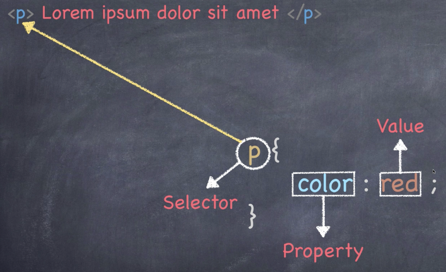
首先介绍一下代码样式,如下图所示:

figure1

三种方式添加CSS

  • 外部样式表 (最常见)
    • CSS 保存在 .css 文件中
    • 在 HTML 里使用 <link> 引用
  • 内部样式表 (较常见)
    • 不使用外部 CSS 文件
    • 将 CSS 放在 HTML <style>
  • 内联样式 (不常见)
    • 仅影响一个元素
    • 在 HTML 元素的 style 属性中添加
<!DOCTYPE html>
<html lang="en">

<head>
<meta charset="UTF-8">
<meta name="viewport" content="width=device-width, initial-scale=1.0">
<style>
h1 {
color: royalblue;
}
</style>
<title>CSS Crash Course</title>
</head>

<body>
<h1>Hello World</h1>
<p>Lorem ipsum dolor sit, amet consectetur adipisicing elit. Voluptates asperiores quod repudiandae in error, et quo
dolores sunt omnis ratione eum esse alias libero nesciunt deserunt eius qui ipsa quisquam.</p>
</body>
</html>
<!DOCTYPE html>
<html lang="en">

<head>
<meta charset="UTF-8">
<meta name="viewport" content="width=device-width, initial-scale=1.0">
<title>CSS Crash Course</title>
</head>

<body>
<h1 style="color: red;">Hello World</h1>
<p>Lorem ipsum dolor sit, amet consectetur adipisicing elit. Voluptates asperiores quod repudiandae in error, et quo
dolores sunt omnis ratione eum esse alias libero nesciunt deserunt eius qui ipsa quisquam.</p>
</body>

</html>
<!DOCTYPE html>
<html lang="en">

<head>
<meta charset="UTF-8">
<meta name="viewport" content="width=device-width, initial-scale=1.0">
<link rel="stylesheet" href="./css/style.css">
<title>CSS Crash Course</title>
</head>

<body>
<h1>Hello World</h1>
<p>Lorem ipsum dolor sit, amet consectetur adipisicing elit. Voluptates asperiores quod repudiandae in error, et quo
dolores sunt omnis ratione eum esse alias libero nesciunt deserunt eius qui ipsa quisquam.</p>
</body>

</html>

CSS 的选择器

对于一段 HTML 代码,

<p class="paragraph" id="paral">Lorem</p>

有三种引用方式:

p {
color:red;
}
.paragraph {
color:red;
}
#para1 {
color:red;
}

值得注意的是,对于 class来说一段可以包含多个相同的class,但是 id 必须保证不同。

CSS 里的颜色

  • 关键词
  • 十六进制
    • #ff0000
  • RGB
    • rgb(244, 0, 0)
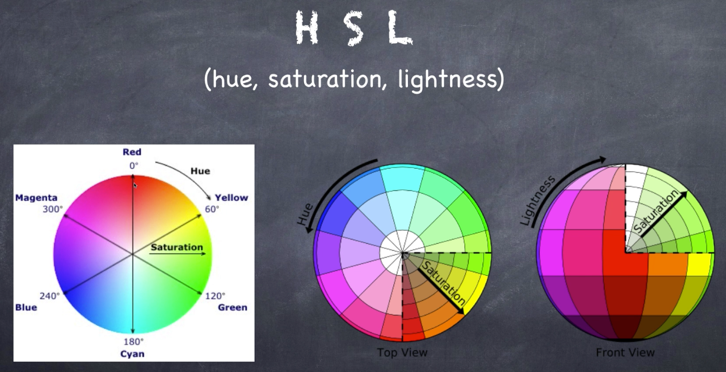
  • HSL 色相(hue),饱和度(saturation),亮度(lightness)
    • hsl(0, 100%, 50%)

figure2

  • RGBA 比 RGB 多一个 α 通道
    • rgb(255, 0, 0, 0.5)
  • HSLA HSL 多一个 α 通道
    • hsl(0, 100%, 50%, 0.5)

CSS 中的字体

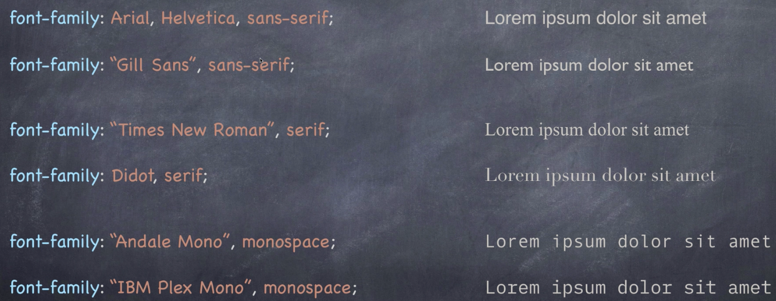
CSS 的字体见下方:

figure3

  • 使用 font-family 来代表 property。
  • sans-serif, 无衬线;serif, 有衬线代表字母的花体
  • Arial, Helvetica,是指前者字体优先,如果Arial找不到,就用Helvetica代替
  • 当字体名字中带空格,需要用引号引出,如"Gil Sans""Times New Roman"
  • monospace 代表等宽

详情见以下网站:

但是,在运用字体时,需要注意电脑的适配性问题,多使用电脑适配率较高的字体。

关于字体排版可以关注, Type is Beautiful

注意的是,如果定义了 body 的颜色,和 box1 的颜色,但是没有定义 box2 的颜色,这时候 box2 将会默认为 body 的颜色。

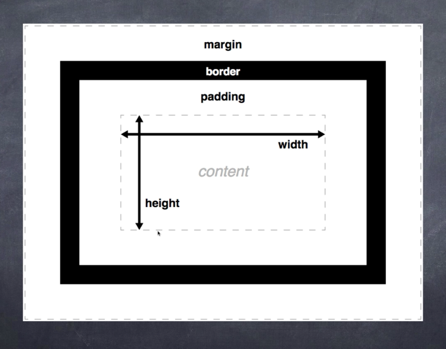
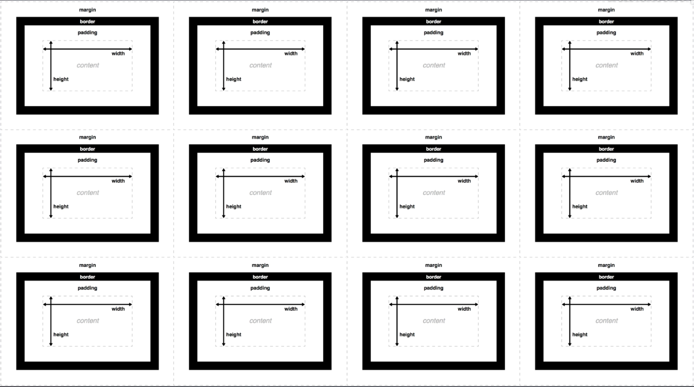
盒子模型(框模型)

figure4

  • content ,可以想象为一张图片或者一段文字,注意文字是上下撑顶的
  • border ,可以称为边框,一般是没有边框宽度的,可以定义颜色
  • padding ,可以理解为内边距,代表内容和边框之间的距离
  • margin ,可以称为外边框,表示外边距

如果我们将很多的盒子放在一起,会是什么样子呢?

figure5

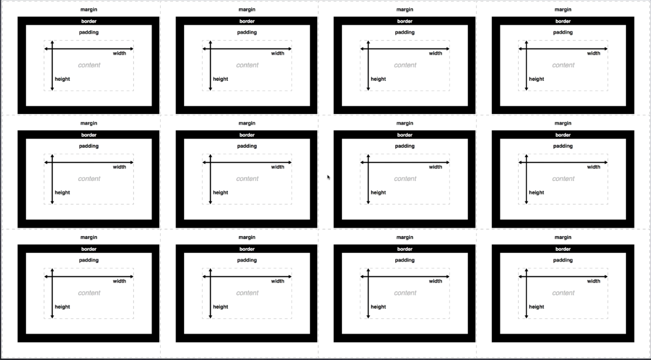
其实上图中的排列方式是错误的,真正的排列方式如下图:

figure6

当两个盒子靠在一起,外边距只会取两个盒子间最大的作为自己的外边距,这称为外边距塌陷

以 margin 为一个实例,

p {
margin-top : 5px ;
margin-bottom : 5px ;
margin-right : 10px ;
margin-left : 10px ;
}

这样指定能用但是比较麻烦,有三种简单的方式:

<!--方法一-->
p {
margin : 5px 10px 5px 10px ;
}
<!--指定顺序为顺时方向:上右下昨-->

<!--方法二-->
p {
margin: 5px 10px ;
}
<!--当上下,左右编剧一样时,可以这样指定,同理全部一样时,指定一个即可-->

<!--方法三-->
p {
margin : 5px 10px 5px ;
}
<!--左右一致,上下不一致,可以这样指定,顺序为上,左右,下-->

padding 同理。

Position in CSS

  • static - 静态定位,默认的
  • relative - 相对定位,可以指定left right偏移
  • absolute - 绝对定位,也可以做偏移,但是通常情况下雨relative共同使用,参考 relative 定位
  • fixed - 固定定位,相对于视窗做定位
  • sticky - 根据导航滚动,一定位置后会粘在一个位置上

代码汇总

HTML 代码

<!DOCTYPE html>
<html lang="en">

<head>
<meta charset="UTF-8">
<meta name="viewport" content="width=device-width, initial-scale=1.0">
<link rel="stylesheet" href="./style.css">
<title>CSS Crash Course</title>
</head>

<body>
<div class="container">
<div class="box1">
<h1>Hello World</h1>
<p>Lorem ipsum dolor sit, amet consectetur adipisicing elit. Voluptates asperiores quod repudiandae in error, et
quo dolores sunt omnis ratione eum esse alias libero nesciunt deserunt eius qui ipsa quisquam.</p>
<button>Button</button>
</div>
<div class="box2">
<h1>Hello World</h1>
<p>Lorem ipsum dolor sit, amet consectetur adipisicing elit. Voluptates asperiores quod repudiandae in error, et
quo dolores sunt omnis ratione eum esse alias libero nesciunt deserunt eius qui ipsa quisquam.</p>
<button>Button</button>
</div>
<div class="list">
<ul>
<li><a href="#">List 1</a></li>
<li><a href="#">List 2</a></li>
<li><a href="#">List 3</a></li>
<li><a href="#">List 4</a></li>
<li><a href="#">List 5</a></li>
</ul>
</div>
<div class="block">
<p>Lorem ipsum dolor sit amet consectetur adipisicing elit. Odio voluptas voluptate eum blanditiis perferendis
error eveniet ducimus magni ut voluptatum!</p>
</div>
<div class="block">
<p>Lorem ipsum dolor sit amet consectetur adipisicing elit. Odio voluptas voluptate eum blanditiis perferendis
error eveniet ducimus magni ut voluptatum!</p>
</div>
<div class="block">
<p>Lorem ipsum dolor sit amet consectetur adipisicing elit. Odio voluptas voluptate eum blanditiis perferendis
error eveniet ducimus magni ut voluptatum!</p>
</div>
<!--注意使用float后需要清除-->
<div class="clearfix"></div>
<div id="main-block">
<p>Lorem ipsum dolor sit amet consectetur adipisicing elit. Voluptatibus, consectetur.</p>
</div>
<div id="sidebar">
<p>Lorem ipsum dolor sit amet consectetur adipisicing elit. Voluptatibus, consectetur.</p>
</div>
<!--注意使用float后需要清除-->
<div class="clearfix"></div>

<ul class="list2">
<li>List Item</li>
<li>List Item</li>
<li>List Item</li>
<li>List Item</li>
<li>List Item</li>
<li>List Item</li>
<li>List Item</li>
<li>List Item</li>
<li>List Item</li>
<li>List Item</li>
<li>List Item</li>
<li>List Item</li>
</ul>
<div class="position-box">
<h1>Heading1</h1>
<h2>Heading2</h2>
</div>
<!--实现按钮或者窗口在边上-->
<!--将按钮固定在右下角-->
<button id="fixed">Button</button>
</div>
<!--这时调整margin边框位置时,可以使用内联的方式-->
<div style="margin-top: 1000px;"></div>
</body>

</html>

CSS 代码

body {
background-color: #f4f4f4;
color: #555555;
font-family: Arial, Helvetica, sans-serif;
font-size: 16px;
font-weight: normal;

font: normal 16px Arial, Helvetica, sans-serif;
line-height: 1.5em;
}

button {
background-color: #444444;
color: #fff;
padding: 10px 15px;
}

/*当鼠标放在button上时*/
button:hover {
background-color: red;
}

/*按下按钮时*/
button:active {
background-color: #fff;
}

a {
text-decoration: none;
color: #555555;
}

a:hover {
color: cyan;
}

/*如果访问过如何处理*/
a:visited {
color: red;
}

.box1 {
background-color: antiquewhite;
color: royalblue;
border: 5px blue solid;
border-right: 5px red solid;
border-left: 8px blue solid;
border-top: 10px green dotted;
border-bottom: 1px firebrike double;

border-bottom-width: 8px;
border-bottom-style: dashed;

padding-top: 10px;
padding-bottom: 10px;
padding-left: 10px;
padding-right: 10px;
/*整体下移 20px*/
margin-top: 20px;
}

.clearfix {
/*去除 left和 right*/
clear: both;
}

.box1 h1 {
font-family: 'Times New Roman', Times, serif;
font-weight: 800;
font-style: italic;
text-decoration: underline;
text-transform:uppercase;
letter-spacing: 1em;
word-spacing: 2em;
}

.box2 {
border: 5px dotted #cccccc;
border-radius: 35px;
padding: 20px;
margin: 20px, 0;

/*相对定位*/
/*position: relative;*/
/*top: 30px;*/
/*left: 30px;*/
/*保留原来位置,并发生偏转,不浮动*/

/*[>绝对定位,在没有上下文 relative 时,是参考当前视窗页面做偏移的<]*/
/*position: absolute;*/
/*top: 30px;*/
/*left: 30px;*/
/*同时决定平移会使整个盒子浮动起来,不会保留原来位置*/
}

.container {
width: 80%;
margin: auto;
}

.box2 {
text-align: center;
}

.list li {
/*改变list前的图片标识*/
/*可以自定义图片*/
/*list-style-image: url(../image/check.jpg);*/

/*也可以用自带的*/
list-style: square;
background-color: red;
}

.block {
float: left;
/*改为三列的形式*/
width: 33.3%;
border: 1px solid #ccc;
/*这时会破坏三列,因为加了边框*/
/*需要用box-sizing来解决*/
box-sizing: border-box;
}

#mian-block {
float: left;
width: 70%;
border: 1px solid #ccc;
box-sizing: border-box;
}

#sidebar {
float: right;
width: 30%;
border: 1px solid #ccc;
box-sizing: border-box;
}

/*较为高级的选择方式 ---- 伪类*/

.list2 li:nth-child(even) {
background-color: grey;
}

.list2 li:first-child {
background-color: red;
}

/*注意不是从0开始计数*/
.list2 li:nth-child(3) {
color: aqua;
}

.position-box {
width: 500px;
height: 500px;
border: 1px solid black;
position: relative;
}

/*relative 和 absolute结合*/
/*box 1,2的偏移量是根据 box 说的*/
/*如果将 box的position 去掉relative,则移到页面开头*/
.position-box h1 {
position: absolute;
top: 50px;
}

.position-box h2 {
position: absolute;
left: 30px;
}

/*固定位置*/
#fixed {
position: fixed;
right: 0;
bottom: 200px;
}

最终网页效果

最终的HTML效果,请点击这里

更多

这里只是谈了很基础的关于 CSS 的介绍。更多内容可以访问mozilla